One click saves it all
Save every photo and video in a post at once, even from long carousels.
Ajiu adds a download button to the Instagram posts you're viewing. One click saves every available photo and video in the best quality your browser can get, with clean, organized filenames.

One click gets everything
Save inspiration, reference material, and your own work without opening every item in a carousel or settling for a screenshot.
Save every photo and video in a post at once, even from long carousels.
Ajiu saves the highest-resolution file your browser can access—not a screenshot.
Creator, date, post code, and item number make every download easy to find later.
Bundle a multi-item post into one ZIP, or keep each original file separate.
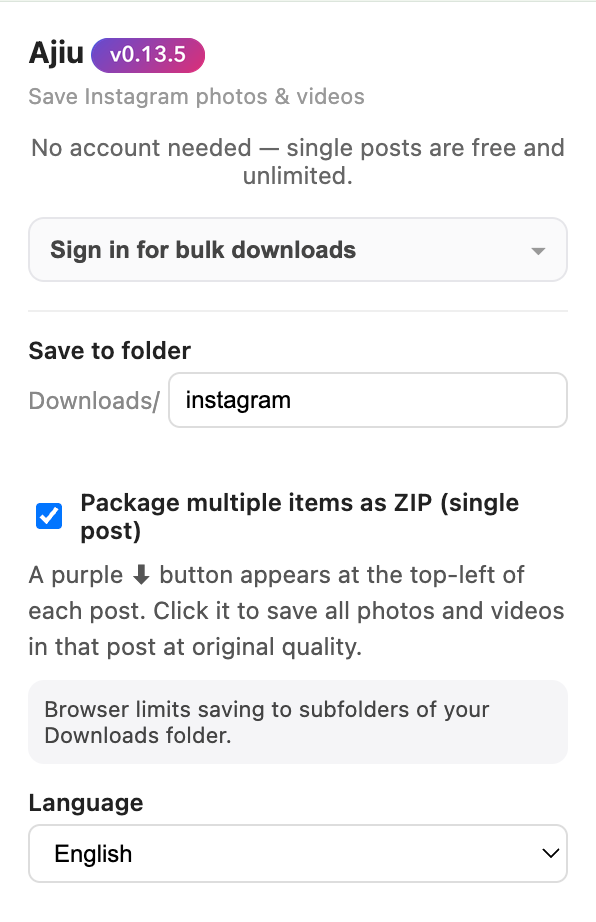
Current Ajiu interface · English and Simplified Chinese available
Simple from the start
Single-post downloads are free and unlimited—no Ajiu account needed. Sign in only when you want to download in bulk.
How Ajiu works
Use Instagram as usual. Ajiu works in the feed, on post pages, in profile grids, and on individual Reel pages.
Look for the purple ⬇ button on the post. Click it once to save every available photo and video.
Your files appear in Downloads/instagram, neatly named so nothing gets overwritten.
Private by design
Your browser fetches the media and saves it directly to your Downloads folder. The files never pass through Ajiu's servers.
Good to know
Yes. You can save as many individual posts as you like without an account. For bulk profile or Saved downloads, sign in with a free account; each run saves up to 50 posts.
Only if your current Instagram session can already view it. Ajiu can't bypass access controls, so region, age, or sensitive-content restrictions may still apply.
Ajiu saves the highest-resolution media file available to your browser session instead of capturing the smaller preview shown on screen.
By default, files go to Downloads/instagram. You can choose another subfolder and optionally package multi-item posts as ZIP files.
No. Ajiu is an independent browser extension and is not affiliated with, endorsed by, or sponsored by Instagram or Meta.
Add Ajiu to Chrome and save every photo and video in the best quality available—organized your way.
Add Ajiu to Chrome